


Tutorial 5#
March 19, 2026#
In this tutorial, you will take a deeper dive into self-attention and Transformers, and explore the zero-shot performance of foundation models for segmentation and reconstruction.
Part 1 - Self-attention#
In the lecture, we have discussed attention. As you likely remember, and can also read in Dive into deep learning, the concept of keys, queries and values is critical to attention. Remember that to get an output value for a query, we obtain a linear combination of all values, weighted by attention coefficients that determine how the query attents to the key of each value.
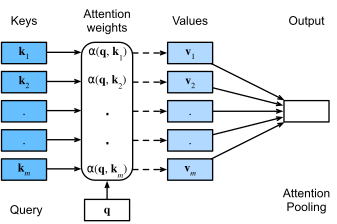
In this exercise, we’re going to use a very simple example to demonstrate this mechanism. We’re going to optimize an attention model that can sort a list of floating point numbers.
First, we import the Python packages to be used.
import torch
import torch.nn as nn
import torch.nn.functional as F
import torch.optim as optim
import math
import matplotlib.pyplot as plt
import seaborn as sns
Now, we’re using PyTorch to implement the attention mechanism, i.e., the equation \(\textrm{Attention}(\mathbf{q}, \mathcal{D}) \stackrel{\textrm{def}}{=} \sum_{i=1}^m \alpha(\mathbf{q}, \mathbf{k}_i) \mathbf{v}_i\).
The code below does several things.
In the __init__ method#
The argument
embed_dimcontains the number of dimension used for all tokens in the model. Remember that this is constant throughout the (Transformer) model.We define an embedding matrix that projects our individual scalars to \(d\)-dimensional embeddings.
Two projection matrices are defined for queries and keys. Remember that these contain the weights of the trainable model. In the lecture, these were called \(W_q\), \(W_k\). Here, they are implemented as
LinearPyTorch layers, and calledq_linearandk_linear. In this case, we do not define a projection matrix for values, but we’ll directly use the values instead.Finally, the attribute
scaleis set as the square root ofembed_dim, to avoid very high attention coefficients.
In the forward method#
An input sample
xis processed. Here,xcontains \(n\) scalars.All scalars are embedded to \(d\)==
embed_dim.Query and key vectors are obtained by multiplication with the projection matrices. Note that
Q,Khave the same shape asx.The attention scores are computed using
bmm. This is a batch matrix matrix product. The output is an \(n \times n\) attention matrix, whose values are scaled usingscale.To make sure that all attention coefficients sum to 1 for a query, a
softmaxis performed over one dimension of this matrix.The output values per token are computed by multiplying the attention coefficients with the values in
V.For each token, the embedding is projected down to a single scalar.
class Simple1DAttention(nn.Module):
    def __init__(self, embed_dim):
        super().__init__()
        self.embedding_layer = nn.Linear(1, embed_dim)
        self.q_linear = nn.Linear(embed_dim, embed_dim)
        self.k_linear = nn.Linear(embed_dim, embed_dim)
        self.v_linear = nn.Linear(embed_dim, embed_dim)
        self.scale = embed_dim ** 0.5
        self.output_layer = nn.Linear(embed_dim, 1)

    def forward(self, x):
        x = x.unsqueeze(-1)
        x_embedded = self.embedding_layer(x)

        Q = self.q_linear(x_embedded)
        K = self.k_linear(x_embedded)
        V = x

        scores = torch.bmm(Q, K.transpose(1, 2)) / self.scale
        attention_weights = F.softmax(scores, dim=-1)
        weighted_values = torch.bmm(attention_weights, V)

        out = weighted_values.squeeze(-1)

        return out, attention_weights
Let’s run this code with an example. First, we define a sequence of unsorted numbers. Then, we process this sequence with the Simple1DAttention module and as output get the current estimate of sorted numbers, and the attention matrix.
embed_dim = 4 # The embedding dimension d used everywhere in the model
seq_len = 5 # Number of tokens
attention_module = Simple1DAttention(embed_dim)

fixed_input = torch.tensor([[9.0, 2.0, 5.0, 1.0, 7.0]])

# Forward pass through the attention module
output, attn_weights = attention_module(fixed_input)
Exercise
The function below can be used to visualize the attention weights provided by th Simple1DAttention module. Use this code.
What do you see along the rows and columns of the attention coefficient matrix?
Explain the attention values that you see in this table, and the current predicted sequence.
def plot_attention(input_seq, output_seq, attn_weights):
    plt.figure(figsize=(6, 5))
    attn_map = attn_weights[0].detach().cpu().numpy()

    # Format sequences for labels
    x_labels = [f"{val:.1f}" for val in input_seq.squeeze().tolist()]
    y_labels = [f"Pos {i}" for i in range(len(x_labels))]

    sns.heatmap(attn_map, annot=True, cmap='Blues', fmt=".2f",
                xticklabels=x_labels, yticklabels=y_labels)


    plt.xlabel("Input sequence (Keys)")
    plt.ylabel("Output sequence (Queries)")
    plt.title(f"Current predicted sequence: \n{[f'{output_val:.2f}' for output_val in output_seq.squeeze().tolist()]}")
    plt.show()

plot_attention(fixed_input, output, attn_weights)
Clearly, a single forward pass through the attention module cannot sort this list. We need to optimize the weights of the module to do this. We do this in a very similar way to how you usually train a neural network: by defining an optimizer and a loss criterion.
model = Simple1DAttention(embed_dim)
optimizer = optim.Adam(model.parameters(), lr=0.005)
criterion = nn.MSELoss()
Now, we can define a training loop. Of course, we first set a target, which we also define as a torch tensor.
fixed_target, _ = torch.sort(fixed_input, dim=1)
Use the below training loop to optimize the model for 5000 iterations.
for epoch in range(5000):
    optimizer.zero_grad()

    # Forward pass
    predictions, attn_weights = model(fixed_input)

    # Calculate loss and optimize
    loss = criterion(predictions, fixed_target)
    loss.backward()
    optimizer.step()

    # Visualize progress every 250 epochs
    if (epoch + 1) % 500 == 0:
        print(f"Epoch {epoch + 1} | Loss: {loss.item():.4f}")
Exercise
Pass fixed_input to the model and inspect with the plot_attention function whether the model has now learned to sort numbers. Explain what you’re seeing. Why did the model work or not work?
Positional encoding#
Clearly, our model hasn’t learned yet how to sort. One key ingredient is missing: positional encoding. The model doesn’t know where each token is located. This is particularly challenging if we try to perform sorting. Now, we’re going to add positional encoding in the model. Remember from the lecture that this matrix should have the same size as that of the token embeddings.
We define a custom PositionalEncoding layer that adds the sinusoidal positional encodings in-place to the embedding matrix. We also define a new Simple1DAttentionWithPE module that uses this positional encoding.
class PositionalEncoding(nn.Module):
    def __init__(self, d_model, max_len=10):
        super().__init__()
        pe = torch.zeros(max_len, d_model)
        position = torch.arange(0, max_len, dtype=torch.float).unsqueeze(1)
        div_term = torch.exp(torch.arange(0, d_model, 2).float() * (-math.log(10000.0) / d_model))

        pe[:, 0::2] = torch.sin(position * div_term)
        pe[:, 1::2] = torch.cos(position * div_term)

        # Register as buffer so it's not treated as a learnable parameter
        self.register_buffer('pe', pe.unsqueeze(0))

    def forward(self, x):
        # Add positional encoding to the embeddings
        return x + self.pe[:, :x.size(1), :]

class Simple1DAttentionWithPE(nn.Module):
    def __init__(self, embed_dim, seq_len):
        super().__init__()
        self.embedding_layer = nn.Linear(1, embed_dim)
        self.pe_layer = PositionalEncoding(embed_dim, seq_len)
        self.q_linear = nn.Linear(embed_dim, embed_dim)
        self.k_linear = nn.Linear(embed_dim, embed_dim)
        self.v_linear = nn.Linear(embed_dim, embed_dim)
        self.scale = embed_dim ** 0.5
        self.output_layer = nn.Linear(embed_dim, 1)

    def forward(self, x):
        x = x.unsqueeze(-1)
        x_embedded = self.embedding_layer(x)              # Embedding
        x_embedded = self.pe_layer(x_embedded)            # Positional encoding

        Q = self.q_linear(x_embedded)
        K = self.k_linear(x_embedded)
        V = x

        scores = torch.bmm(Q, K.transpose(1, 2)) / self.scale
        attention_weights = F.softmax(scores, dim=-1)
        weighted_values = torch.bmm(attention_weights, V)

        out = weighted_values.squeeze(-1)

        return out, attention_weights
Exercise
Use the training code provided before to train this new attention model. Inspect its results.
What does the attention matrix look like now?
Does this match your expectation?
Can you explain why the matrix has very high values in the top and bottom rows?
Part 2 - Exploring the learned latent space of a foundation model#
In this part we probe what the self-supervised DINOv2 model has learned by:
Part 2.1 — training a lightweight linear foreground/background classifier on top of frozen DINOv2 patch features and visualising the segmentation output.
Part 2.1a — projecting foreground patch features to 3 components via PCA and displaying them as an RGB image.
Part 2.1b — doing the same for all patches (entire image) and comparing what the foreground-anchored vs. unconstrained PCA reveals.
Imports#
import io
import tarfile
import urllib.request

import torch
import numpy as np
import matplotlib.pyplot as plt
import torchvision.transforms.functional as TF

from PIL import Image
from tqdm import tqdm
from scipy import signal
from sklearn.decomposition import PCA
from sklearn.pipeline import make_pipeline
from sklearn.preprocessing import StandardScaler
from sklearn.metrics import average_precision_score
from sklearn.linear_model import LogisticRegression
Device and normalisation constants#
print("================== IF USING MPS GIVES ISSUES, SELECT CPU ==================")
device = torch.device("cuda" if torch.cuda.is_available() else "mps" if torch.backends.mps.is_available() else "cpu")
print(f"Using device: {device}")

# DINOv2 was trained on LVD 1.6B dataset, so inputs are normalised with standard image statistics.
IMAGE_MEAN = (0.485, 0.456, 0.406)
IMAGE_STD  = (0.229, 0.224, 0.225)
Load DINOv2 from torch.hub#
DINOv2 (Oquab et al., 2023) is a self-supervised Vision Transformer trained via the
DINO / iBOT objective on 142 M curated images. We load it directly from
facebookresearch/dinov2 on torch.hub.
We expose two sizes suitable for an interactive session:
|
Hub identifier |
Params |
Patch |
|---|---|---|---|
|
|
~22 M |
14 px |
|
|
~86 M |
14 px |
The larger variants (large, giant) require far more GPU memory and are not suitable for this tutorial.
VARIANTS = {
    "v3": "dinov3",
    "v2": "dinov2"
}
MODEL_CONFIGS = {
    "s_v2": ("dinov2_vits14", 14),
    "s_v3": ("dinov3_vits16", 16),
    "b_v2":  ("dinov2_vitb14", 14),
    "b_v3":  ("dinov3_vitb16", 16),
}

# Change variant between v3, v2 and model_size to "s" or "b"
variant = "v2"
model_size = "s"

model_name, patch_size = MODEL_CONFIGS[f"{model_size}_{variant}"]
model = torch.hub.load(f"facebookresearch/{VARIANTS[variant]}", model_name)
model = model.to(device).eval()
print(f"Loaded {model_name}  (patch_size={patch_size})")
Helper utilities#
ViT-based models require that both spatial dimensions are exact multiples of the
patch size. resize_image_for_patches handles this while preserving the aspect
ratio. create_patch_quantizer pools a pixel-level mask down to patch resolution
using a fixed average-pooling convolution – the resulting value tells us what
fraction of each patch is foreground.
def resize_image_for_patches(image, image_size=448, patch_size=14):
    """Resize *image* so that height = image_size and width is a multiple of
    patch_size (aspect ratio is preserved).  Returns a float tensor (3, H, W).
    """
    w, h = image.size
    h_patches = image_size // patch_size
    w_patches = int((w * image_size) / (h * patch_size))
    return TF.to_tensor(
        TF.resize(image, (h_patches * patch_size, w_patches * patch_size))
    )


def create_patch_quantizer(patch_size):
    """Return a fixed Conv2d that average-pools a single-channel mask from pixel
    resolution to patch resolution.  Values close to 1 = fully foreground patch.
    """
    filt = torch.nn.Conv2d(1, 1, patch_size, stride=patch_size, bias=False)
    filt.weight.data.fill_(1.0 / (patch_size * patch_size))
    return filt


def load_image_from_url(url: str) -> Image.Image:
    """Download and return a PIL Image from *url*."""
    with urllib.request.urlopen(url) as f:
        return Image.open(io.BytesIO(f.read())).copy()
Part 2.1 — Foreground / Background Classifier#
We will train a logistic regression classifier directly on DINOv2 patch features, without fine-tuning the model weights. This is possible because DINOv2 features are rich enough to separate foreground from background with a simple linear boundary — a striking demonstration of what self-supervised pre-training learns.
The training data is a small set of natural images with foreground/background masks provided by the DINOv2 authors. Using natural images here is fine for illustrating the concept; the same approach transfers directly to medical images (e.g. tissue vs background in histology slides).
Load training data#
def load_training_data():
    """Download training images and RGBA masks from the DINOv2 public bucket.
    Returns two lists of PIL Images: RGB images and RGBA masks.
    """
    IMAGES_URI = (
        "https://dl.fbaipublicfiles.com/dinov3/notebooks/"
        "foreground_segmentation/foreground_segmentation_images.tar.gz"
    )
    LABELS_URI = (
        "https://dl.fbaipublicfiles.com/dinov3/notebooks/"
        "foreground_segmentation/foreground_segmentation_labels.tar.gz"
    )

    def _load_tar(uri):
        images = []
        with urllib.request.urlopen(uri) as f:
            tar = tarfile.open(fileobj=io.BytesIO(f.read()))
            for member in sorted(tar.getmembers(), key=lambda m: m.name):
                data = tar.extractfile(member)
                if data is not None:
                    img = Image.open(data)
                    img.load()   # force decode while the file-object is still open
                    images.append(img)
        return images

    images = _load_tar(IMAGES_URI)
    labels = _load_tar(LABELS_URI)
    assert len(images) == len(labels), f"{len(images)=}, {len(labels)=}"
    print(f"Loaded {len(images)} image / mask pairs")
    return images, labels
images, labels = load_training_data()
Visualise one image / mask pair#
Each label is an RGBA image whose alpha channel encodes the foreground mask. We split it into a foreground composite (fg pixels from the original image, transparent elsewhere) and a background composite (the complement) to sanity-check the annotations.
def visualize_image_mask_pair(images, labels, index=0):
    """Show image, RGBA mask, foreground crop, and background crop side-by-side."""
    image = images[index]
    mask  = labels[index]

    foreground = Image.composite(image, mask, mask)

    # Invert alpha channel to get the background mask
    bg_np = np.array(mask).copy()
    bg_np[:, :, 3] = 255 - bg_np[:, :, 3]
    bg_mask = Image.fromarray(bg_np)
    background = Image.composite(image, bg_mask, bg_mask)

    fig, axes = plt.subplots(1, 4, figsize=(16, 4))
    for ax, img, title in zip(
        axes,
        [image, mask, foreground, background],
        ["Image", "Mask (alpha)", "Foreground", "Background"],
    ):
        ax.imshow(img)
        ax.set_title(title)
        ax.axis("off")
    plt.tight_layout()
    plt.show()
visualize_image_mask_pair(images, labels, index=0)
Feature extraction#
For each training image we:
Resize it so the height equals
image_size(a multiple ofpatch_size).Normalise with ImageNet statistics.
Forward through frozen DINOv2 and collect patch tokens from the last block via
get_intermediate_layers(n=1, reshape=True, norm=False).n=1returns the last transformer block only.reshape=Truereturns features as (B, dim, H_patches, W_patches).norm=Falseskips the final layer norm (raw pre-norm features).
Quantise the alpha mask to patch resolution and threshold at 0.01 / 0.99 so only unambiguous fg / bg patches are kept as training labels.
The result is a design matrix xs of shape (N, embed_dim) and a label vector
ys with values near 0 (background) or 1 (foreground).
def extract_features_and_labels(model, images, labels, patch_size=14, image_size=448):
    """Extract DINOv2 patch features and binary fg/bg labels for all training images.

    Returns
    -------
    xs          : torch.Tensor  (N, embed_dim)
    ys          : torch.Tensor  (N,)   values ≈ 0 or ≈ 1
    image_index : torch.Tensor  (N,)   which training image each patch came from
    """
    patch_quant = create_patch_quantizer(patch_size)

    xs, ys, image_index = [], [], []

    with torch.inference_mode():
        for i in tqdm(range(len(images)), desc="Extracting features"):
            # ---- mask → per-patch foreground fraction ----
            alpha = labels[i].split()[-1]   # alpha channel of the RGBA mask
            mask_t = resize_image_for_patches(alpha, image_size, patch_size)
            patch_labels = patch_quant(mask_t).squeeze().view(-1).detach().cpu()
            ys.append(patch_labels)

            # ---- image → DINOv2 patch features ----
            img_rgb = images[i].convert("RGB")
            img_t = resize_image_for_patches(img_rgb, image_size, patch_size)
            img_t = TF.normalize(img_t, mean=IMAGE_MEAN, std=IMAGE_STD)
            img_t = img_t.unsqueeze(0).to(device)

            feats = model.get_intermediate_layers(img_t, n=1, reshape=True, norm=False)
            # feats[-1]: (1, embed_dim, H_p, W_p)
            f = feats[-1].squeeze()                        # (embed_dim, H_p, W_p)
            dim = f.shape[0]
            xs.append(f.view(dim, -1).permute(1, 0).detach().cpu())  # (H_p*W_p, dim)
            image_index.append(i * torch.ones(patch_labels.shape))

    xs = torch.cat(xs)
    ys = torch.cat(ys)
    image_index = torch.cat(image_index)

    # Keep only clearly fg (>0.99) or clearly bg (<0.01) patches
    clear = (ys < 0.01) | (ys > 0.99)
    xs, ys, image_index = xs[clear], ys[clear], image_index[clear]

    print(f"Feature matrix : {xs.shape}")
    print(f"Labels         : fg={int((ys > 0.5).sum())}  bg={int((ys <= 0.5).sum())}")
    return xs, ys, image_index
# image_size must be an exact multiple of patch_size.
# 448 = 32 × 14  →  32×32 patch grid; a good balance of resolution and speed.
image_size = 448  # try with: 1344, 896, 672, 196

xs, ys, image_index = extract_features_and_labels(
    model, images, labels, patch_size=patch_size, image_size=image_size
)
Cross-validate to select the regularisation strength C#
We use leave-one-image-out cross-validation to pick the best C for logistic
regression. We sweep three values on a log-scale and report average-precision (AP)
for each fold. AP summarises the precision–recall curve into a single number;
higher is better.
def cross_validate_classifier(xs, ys, image_index, cs=None):
    """Leave-one-image-out CV over logistic regression regularisation C.

    Returns
    -------
    scores : np.ndarray  (n_images, len(cs))  – AP per fold / C
    cs     : np.ndarray  – tested C values
    """
    if cs is None:
        cs = np.logspace(-2, 0, 3)   # [0.01, 0.1, 1.0]

    n_images = int(image_index.max().item()) + 1
    scores = np.zeros((n_images, len(cs)))

    for i in range(n_images):
        train_mask = image_index != float(i)
        x_tr, y_tr = xs[train_mask].numpy(), (ys[train_mask] > 0.5).long().numpy()
        x_va, y_va = xs[~train_mask].numpy(), (ys[~train_mask] > 0.5).long().numpy()

        for j, c in enumerate(cs):
            clf = make_pipeline(
                StandardScaler(),
                LogisticRegression(C=c, max_iter=10_000, random_state=0),
            )
            clf.fit(x_tr, y_tr)
            proba = clf.predict_proba(x_va)[:, 1]
            scores[i, j] = average_precision_score(y_va, proba)
            print(f"  fold {i+1}/{n_images}  C={c:.2e}  AP={scores[i, j]:.3f}")

    return scores, cs
scores, cs = cross_validate_classifier(xs, ys, image_index)

mean_ap = scores.mean(axis=0)
best_c  = cs[np.argmax(mean_ap)]
print(f"\nMean AP:  {dict(zip(cs.round(3), mean_ap.round(3)))}")
print(f"Best C  = {best_c:.3f}")
Train the final classifier on all data#
def train_final_classifier(xs, ys, c):
    """Train logistic regression on all available data with regularisation C."""
    clf = make_pipeline(
        StandardScaler(),
        LogisticRegression(C=c, max_iter=100_000, random_state=0, verbose=1),
    )
    clf.fit(xs.numpy(), (ys > 0.5).long().numpy())
    return clf
clf = train_final_classifier(xs, ys, best_c)
Run foreground segmentation and visualise#
We apply the classifier patch-by-patch to a held-out test image. The raw per-patch scores are optionally smoothed with a 3×3 median filter to suppress isolated false positives / negatives at patch boundaries.
def run_inference(model, clf, image, patch_size=14, image_size=448, median_filter=True):
    """Return the foreground score map and the resized image tensor.

    Parameters
    ----------
    image : PIL.Image, URL string, or local file path
    """
    if isinstance(image, str):
        image = load_image_from_url(image) if image.startswith("http") \
                else Image.open(image).convert("RGB")

    img_t    = resize_image_for_patches(image, image_size, patch_size)
    img_norm = TF.normalize(img_t, mean=IMAGE_MEAN, std=IMAGE_STD)

    with torch.inference_mode():
        feats = model.get_intermediate_layers(
            img_norm.unsqueeze(0).to(device), n=1, reshape=True, norm=False
        )
        x = feats[-1].squeeze().detach().cpu()       # (dim, H_p, W_p)
        dim = x.shape[0]
        x_flat = x.view(dim, -1).permute(1, 0)       # (N_patches, dim)

    h_patches, w_patches = [d // patch_size for d in img_t.shape[1:]]
    fg = clf.predict_proba(x_flat.numpy())[:, 1].reshape(h_patches, w_patches)

    if median_filter:
        fg = torch.from_numpy(signal.medfilt2d(fg, kernel_size=3))
    else:
        fg = torch.from_numpy(fg)

    return fg, img_t


def visualize_inference_result(img_t, fg_score, title=""):
    """Show input image, foreground score heatmap, and binary mask."""
    fig, axes = plt.subplots(1, 3, figsize=(12, 4))

    axes[0].imshow(img_t.permute(1, 2, 0))
    axes[0].set_title("Input image")
    axes[0].axis("off")

    im = axes[1].imshow(fg_score, cmap="viridis")
    axes[1].set_title("Foreground score")
    axes[1].axis("off")
    plt.colorbar(im, ax=axes[1], fraction=0.046, pad=0.04)

    im2 = axes[2].imshow(fg_score > 0.5, cmap="viridis")
    axes[2].set_title("Binary mask  (threshold 0.5)")
    axes[2].axis("off")
    plt.colorbar(im2, ax=axes[2], fraction=0.046, pad=0.04)

    if title:
        fig.suptitle(title, fontsize=13)
    plt.tight_layout()
    plt.show()
# Test images from the DINOv2 demo set (natural images – suitable as a proxy)
cat_url = "https://dl.fbaipublicfiles.com/dinov3/notebooks/foreground_segmentation/test_image.jpg"
dog_url = "https://dl.fbaipublicfiles.com/dinov3/notebooks/pca/test_image.jpg"

fg_score_cat, img_t_cat = run_inference(model, clf, cat_url, patch_size, image_size)
visualize_inference_result(img_t_cat, fg_score_cat, title="Cat – foreground segmentation")

fg_score_dog, img_t_dog = run_inference(model, clf, dog_url, patch_size, image_size)
visualize_inference_result(img_t_dog, fg_score_dog, title="Dog – foreground segmentation")
Part 2.1a — PCA of foreground patch features#
We now take the patch features of the foreground patches only (selected by the classifier) and fit a PCA with 3 components. When this 3-dimensional projection is mapped to RGB, patches that differ in their DINOv2 representation will appear in different colours — revealing texture and semantic structure within the foreground.
Steps:
Re-extract patch features for the test image.
Use the foreground score ≥ 0.5 to select foreground patches.
Fit PCA on foreground patches only (so components capture fg variation).
Apply
sigmoid(2·x)to stretch values into [0, 1] for display.Zero out background patches so they appear black.
def apply_pca_to_foreground(model, clf, image, patch_size=14, image_size=448,
                             pca_components=3, apply_sigmoid=True):
    """Fit PCA on foreground patch features and return a colour-coded PCA image.

    Returns
    -------
    pca_rgb  : torch.Tensor  (3, H_p, W_p)  – RGB PCA visualisation (bg = black)
    fg_score : torch.Tensor  (H_p, W_p)     – foreground score map
    img_t    : torch.Tensor  (3, H, W)      – resized input image
    pca      : fitted sklearn PCA object
    """
    if isinstance(image, str):
        image = load_image_from_url(image) if image.startswith("http") \
                else Image.open(image).convert("RGB")

    img_t    = resize_image_for_patches(image, image_size, patch_size)
    img_norm = TF.normalize(img_t, mean=IMAGE_MEAN, std=IMAGE_STD)

    with torch.inference_mode():
        feats = model.get_intermediate_layers(
            img_norm.unsqueeze(0).to(device), n=1, reshape=True, norm=False
        )
        x = feats[-1].squeeze().detach().cpu()   # (dim, H_p, W_p)
        dim = x.shape[0]
        x_flat = x.view(dim, -1).permute(1, 0)  # (N_patches, dim)

    h_patches, w_patches = [d // patch_size for d in img_t.shape[1:]]

    # ---- foreground mask (with median smoothing) ----
    fg = clf.predict_proba(x_flat.numpy())[:, 1].reshape(h_patches, w_patches)
    fg_score = torch.from_numpy(signal.medfilt2d(fg, kernel_size=3))
    fg_mask  = fg_score.view(-1) >= 0.5   # (N_patches,) bool

    fg_patches = x_flat[fg_mask]
    if len(fg_patches) == 0:
        print("No foreground patches found!")
        return None, None, None, None

    # ---- PCA fitted on fg patches only ----
    # whiten=True scales each component to unit variance, improving colour contrast.
    pca = PCA(n_components=pca_components, whiten=True)
    pca.fit(fg_patches.numpy())

    # Project all patches so the spatial layout is preserved
    projected = torch.from_numpy(
        pca.transform(x_flat.numpy())
    ).view(h_patches, w_patches, pca_components)  # (H_p, W_p, 3)

    if apply_sigmoid:
        projected = torch.sigmoid(projected * 2.0)

    # Zero out background pixels
    pca_rgb = projected.permute(2, 0, 1) * (fg_score.unsqueeze(0) >= 0.5).float()

    return pca_rgb, fg_score, img_t, pca


def visualize_pca_foreground(img_t, fg_score, pca_rgb, pca):
    """Show input image, foreground score, and FG-anchored PCA RGB map."""
    evr = pca.explained_variance_ratio_
    fig, axes = plt.subplots(1, 3, figsize=(14, 4))

    axes[0].imshow(img_t.permute(1, 2, 0))
    axes[0].set_title("Input image")
    axes[0].axis("off")

    im = axes[1].imshow(fg_score, cmap="viridis")
    axes[1].set_title("Foreground score")
    axes[1].axis("off")
    plt.colorbar(im, ax=axes[1], fraction=0.046, pad=0.04)

    axes[2].imshow(pca_rgb.permute(1, 2, 0))
    axes[2].set_title(
        f"PCA – foreground only\nEVR: {evr.round(2)}  (total {evr.sum():.2f})"
    )
    axes[2].axis("off")

    plt.tight_layout()
    plt.show()
pca_rgb_fg_cat, fg_score_cat, img_t_cat, pca_fg_cat = apply_pca_to_foreground(
    model, clf, cat_url, patch_size, image_size
)
if pca_rgb_fg_cat is not None:
    visualize_pca_foreground(img_t_cat, fg_score_cat, pca_rgb_fg_cat, pca_fg_cat)
    print(f"Explained variance ratio: {pca_fg_cat.explained_variance_ratio_}")
    print(f"Total explained variance: {pca_fg_cat.explained_variance_ratio_.sum():.3f}")
pca_rgb_fg_dog, fg_score_dog, img_t_dog, pca_fg_dog = apply_pca_to_foreground(
    model, clf, dog_url, patch_size, image_size
)
if pca_rgb_fg_dog is not None:
    visualize_pca_foreground(img_t_dog, fg_score_dog, pca_rgb_fg_dog, pca_fg_dog)
Part 2.1b — PCA of the entire image (all patches)#
Here we fit PCA on all patches without any foreground selection. We also extract the CLS token — DINOv2’s global image summary — and compute the cosine similarity between every patch token and the CLS token. This gives an attention-like saliency map: patches most similar to the global representation score highest, often corresponding to the salient object.
Comparing 2.1a and 2.1b:
In 2.1a the PCA components capture variation within the foreground, so colours reflect semantic/texture differences inside the object.
In 2.1b the first PCA component often separates foreground from background because that is the dominant source of variation across all patches.
def apply_pca_to_entire_image(model, image, patch_size=14, image_size=448,
                               pca_components=3, apply_sigmoid=True):
    """Fit PCA on all patch features and compute CLS-token cosine similarity.

    The CLS token is a learned global summary of the image.  Cosine similarity
    between each patch and the CLS token gives an unsupervised saliency map.

    Returns
    -------
    pca_rgb    : torch.Tensor  (3, H_p, W_p)
    img_t      : torch.Tensor  (3, H, W)
    pca        : fitted sklearn PCA object
    cosine_sim : torch.Tensor  (H_p, W_p)  – similarity of each patch to CLS token
    """
    if isinstance(image, str):
        image = load_image_from_url(image) if image.startswith("http") \
                else Image.open(image).convert("RGB")

    img_t    = resize_image_for_patches(image, image_size, patch_size)
    img_norm = TF.normalize(img_t, mean=IMAGE_MEAN, std=IMAGE_STD)

    with torch.inference_mode():
        # return_class_token=True → each element is (patch_tokens, cls_token)
        feats = model.get_intermediate_layers(
            img_norm.unsqueeze(0).to(device),
            n=1, reshape=True, norm=False, return_class_token=True,
        )
        x, cls_token = feats[-1]               # x: (1, dim, H_p, W_p)
        x         = x.squeeze().detach().cpu()       # (dim, H_p, W_p)
        cls_token = cls_token.squeeze().detach().cpu()  # (dim,)

    dim = x.shape[0]
    x_flat = x.view(dim, -1).permute(1, 0)    # (N_patches, dim)
    h_patches, w_patches = [d // patch_size for d in img_t.shape[1:]]

    # ---- PCA on all patches ----
    pca = PCA(n_components=pca_components, whiten=True)
    pca.fit(x_flat.numpy())

    projected = torch.from_numpy(
        pca.transform(x_flat.numpy())
    ).view(h_patches, w_patches, pca_components)

    if apply_sigmoid:
        projected = torch.sigmoid(projected * 2.0)

    pca_rgb = projected.permute(2, 0, 1)   # (3, H_p, W_p)

    # ---- Cosine similarity to CLS token ----
    # We L2-normalise both the patch features and the CLS token before the dot product
    # so the result is purely angular (invariant to feature magnitude).
    x_norm   = torch.nn.functional.normalize(x_flat, dim=1)     # (N, dim)
    cls_norm = torch.nn.functional.normalize(cls_token, dim=0)  # (dim,)
    cosine_sim = (x_norm @ cls_norm).view(h_patches, w_patches)

    return pca_rgb, img_t, pca, cosine_sim


def visualize_pca_entire_image(img_t, pca_rgb, cosine_sim, pca):
    """Show input image, full-image PCA RGB map, and CLS cosine similarity."""
    evr = pca.explained_variance_ratio_
    fig, axes = plt.subplots(1, 3, figsize=(14, 4))

    axes[0].imshow(img_t.permute(1, 2, 0))
    axes[0].set_title("Input image")
    axes[0].axis("off")

    axes[1].imshow(pca_rgb.permute(1, 2, 0))
    axes[1].set_title(
        f"PCA – all patches\nEVR: {evr.round(2)}  (total {evr.sum():.2f})"
    )
    axes[1].axis("off")

    # Normalise cosine similarity to [0, 1] for display
    cs      = cosine_sim.detach().cpu()
    cs_norm = (cs - cs.min()) / (cs.max() - cs.min() + 1e-8)
    im = axes[2].imshow(cs_norm, cmap="viridis")
    axes[2].set_title("Cosine similarity\nto CLS token")
    axes[2].axis("off")
    plt.colorbar(im, ax=axes[2], fraction=0.046, pad=0.04)

    plt.tight_layout()
    plt.show()
pca_rgb_all_cat, img_t_cat, pca_all_cat, cosine_sim_cat = apply_pca_to_entire_image(
    model, cat_url, patch_size, image_size
)
visualize_pca_entire_image(img_t_cat, pca_rgb_all_cat, cosine_sim_cat, pca_all_cat)
print(f"Explained variance ratio: {pca_all_cat.explained_variance_ratio_}")
print(f"Total explained variance: {pca_all_cat.explained_variance_ratio_.sum():.3f}")
pca_rgb_all_dog, img_t_dog, pca_all_dog, cosine_sim_dog = apply_pca_to_entire_image(
    model, dog_url, patch_size, image_size
)
visualize_pca_entire_image(img_t_dog, pca_rgb_all_dog, cosine_sim_dog, pca_all_dog)
Exercises for Part 2
In Part 2.1a, do patches of the same semantic region (e.g. fur, eyes, ears) share the same colour? What does that tell you about DINOv2’s representations?
In Part 2.1b, which PCA component seems to separate foreground from background? How does the result change when you switch from
"small"to"base"?The CLS-token cosine similarity gives an unsupervised saliency map with no labels. How does it compare to the trained foreground classifier from Part 2.1?
What do you see when repeating the experiment with different resolutions?
[OPTIONAL] What are the differences between dinov3 and dinov2 models? This is optional since dinov3 models may not be possible to download automatically and might require a manual download.:::
Part 3 - Using Reconstruct Anything Model#
In this part, we use the Reconstruct Anything Model (RAM) for CT-like reconstruction.
RAM is a single feed‑forward model trained on many linear inverse problems and can adapt
to new physics at test time (paper: https://arxiv.org/abs/2503.08915).
Think of it as a learned reconstruction prior that works alongside the CT forward operator
(Radon transform) without task‑specific training.
What you will see:
3.1 Full‑view CT reconstruction (FBP baseline + RAM).
3.2 Noisy CT and sparse‑view CT (dose reduction).
3.3 Hands‑on sweeps to build intuition using SSIM curves.
3.1 Setup#
Same phantoms, same CT idea, we use RAM to invert the CT physics directly. We compare it to filtered back‑projection (FBP), the fast analytic method still common in clinics.
3.1a Install and imports#
Run these only if your environment is missing the packages.
!pip install deepinv
!pip install dival
import deepinv as dinv
import dival
from skimage.metrics import peak_signal_noise_ratio, structural_similarity
3.1b Helper utilities#
def sample_ellipses_batch(gen, batch_size=4):
    xs = []
    for _ in range(batch_size):
        _, ground_truth = next(gen)
        xs.append(np.asarray(ground_truth))
    # Return tensor with shape (B, 1, H, W)
    x_gt = torch.from_numpy(np.stack(xs)).float().unsqueeze(1)
    return x_gt


def show_triplet(x_gt, x_fbp, x_ram, idx=0, titles=None):
    fig, axs = plt.subplots(1, 3, figsize=(12, 4))
    axs[0].imshow(x_gt[idx, 0].detach().cpu(), cmap="gray")
    axs[0].set_title("Ground truth" if titles is None else titles[0])
    axs[0].axis("off")
    axs[1].imshow(x_fbp[idx, 0].detach().cpu(), cmap="gray")
    axs[1].set_title("FBP" if titles is None else titles[1])
    axs[1].axis("off")
    axs[2].imshow(x_ram[idx, 0].detach().cpu(), cmap="gray")
    axs[2].set_title("RAM" if titles is None else titles[2])
    axs[2].axis("off")
    plt.show()


def compute_metrics(x_hat, x_ref):
    x_hat_np = x_hat.detach().cpu().numpy()
    x_ref_np = x_ref.detach().cpu().numpy()
    psnrs, ssims = [], []
    for i in range(x_ref_np.shape[0]):
        data_range = x_ref_np[i, 0].max() - x_ref_np[i, 0].min()
        psnrs.append(
            peak_signal_noise_ratio(x_ref_np[i, 0], x_hat_np[i, 0], data_range=data_range)
        )
        ssims.append(
            structural_similarity(x_ref_np[i, 0], x_hat_np[i, 0], data_range=data_range)
        )
    return float(np.mean(psnrs)), float(np.mean(ssims))
3.1c Data and device#
We reuse the ellipses phantoms from the reconstruction tutorial. Each sample is a synthetic CT slice. The forward operator maps images to sinograms (projection data), which is exactly what a CT scanner measures.
# Full CT view (1k projections)
n_views = 1000

dataset = dival.get_standard_dataset("ellipses", impl="skimage",n_views=n_views)
test_gen = dataset.generator(part="test")

#infer the image space dimentions
sinogram_sample, gt_sample = next(test_gen)
img_width = np.asarray(gt_sample).shape[-1]

# Reset generator after peeking
test_gen = dataset.generator(part="test")

ram_device = dinv.utils.get_device()
print(f"Using device: {ram_device}")

# you can change the batch_size
x_gt = sample_ellipses_batch(test_gen, batch_size=1).to(ram_device)

# Define the CT forward operator (Radon transform)
ct_physics = dinv.physics.Tomography(
    img_width=img_width,
    angles=n_views,
    device=ram_device,
    normalize=True,
)

# Simulate full‑view sinograms and reconstruct with analytic FBP
# (fast baseline used in many clinical pipelines)
sino_full = ct_physics(x_gt)
x_fbp_full = ct_physics.fbp(sino_full)

plt.figure(figsize=(4, 4))
plt.imshow(x_fbp_full[0, 0].detach().cpu(), cmap="gray")
plt.title("FBP (full‑view)")
plt.axis("off")
plt.show()
3.1d RAM zero‑shot reconstruction (full‑view)#
ram_model = dinv.models.RAM(pretrained=True, device=ram_device)
ram_model.eval()

with torch.no_grad():
    x_ram_full = ram_model(sino_full, ct_physics)

show_triplet(x_gt, x_fbp_full, x_ram_full, idx=0)

psnr_fbp_full, ssim_fbp_full = compute_metrics(x_fbp_full, x_gt)
psnr_ram_full, ssim_ram_full = compute_metrics(x_ram_full, x_gt)

print(f"Full‑view FBP -> PSNR: {psnr_fbp_full:.2f}, SSIM: {ssim_fbp_full:.3f}")
print(f"Full‑view RAM -> PSNR: {psnr_ram_full:.2f}, SSIM: {ssim_ram_full:.3f}")
3.2 Denoising (noisy sinograms)#
Low‑dose CT increases noise in the sinogram (photon noise + electronic noise). We simulate this and compare FBP vs. RAM. Here RAM replaces hand‑designed regularization with a learned prior.
3.2a Generate noisy measurements#
# Noise model used to corrupt sinograms (Poisson = photon noise, Gaussian = electronic noise)
noise_gain = 0.001
noise_sigma = 0.001
noise_model = dinv.physics.PoissonGaussianNoise(gain=noise_gain, sigma=noise_sigma)
ct_physics_noisy = dinv.physics.Tomography(
    img_width=img_width,
    angles=n_views,
    device=ram_device,
    noise_model=noise_model,
    normalize=True,
)

# Noisy sinograms + DeepInverse FBP
sino_noisy = ct_physics_noisy(x_gt)
x_fbp_noisy = ct_physics_noisy.fbp(sino_noisy)
3.2b RAM reconstruction on noisy sinograms#
with torch.no_grad():
    x_ram_noisy = ram_model(sino_noisy, ct_physics_noisy)

show_triplet(x_gt, x_fbp_noisy, x_ram_noisy, idx=0)

psnr_fbp_noisy, ssim_fbp_noisy = compute_metrics(x_fbp_noisy, x_gt)
psnr_ram_noisy, ssim_ram_noisy = compute_metrics(x_ram_noisy, x_gt)

print(f"Noisy FBP -> PSNR: {psnr_fbp_noisy:.2f}, SSIM: {ssim_fbp_noisy:.3f}")
print(f"Noisy RAM -> PSNR: {psnr_ram_noisy:.2f}, SSIM: {ssim_ram_noisy:.3f}")
3.2c Sparse‑view case (dose reduction)#
Fewer views = lower dose (or faster scans), but tougher reconstruction. We test both noiseless and noisy sparse‑view sinograms.
Sparse‑view illustration (Academic Radiology 2022).

Source: Low-dose CT Perfusion with Sparse-view Filtered Back Projection in Acute Ischemic Stroke, Academic Radiology 2022; 29(10):1502–1511. DOI: 10.1016/j.acra.2022.01.018
sparse_factor = 20  # e.g., keep 1 out of every 20 views
n_views_sparse = max(10, n_views // sparse_factor)

# Sparse‑view CT physics (fewer projection views)
ct_physics_sparse = dinv.physics.Tomography(
    img_width=img_width,
    angles=n_views_sparse,
    device=ram_device,
    normalize=True,
)

# Noiseless sparse‑view sinograms + FBP (expect streak artifacts)
sino_sparse = ct_physics_sparse(x_gt)
x_fbp_sparse = ct_physics_sparse.fbp(sino_sparse)

# RAM reconstruction may reduce streaking by using its learned prior
with torch.no_grad():
    x_ram_sparse = ram_model(sino_sparse, ct_physics_sparse)

show_triplet(x_gt, x_fbp_sparse, x_ram_sparse, idx=0)

psnr_fbp_sparse, ssim_fbp_sparse = compute_metrics(x_fbp_sparse, x_gt)
psnr_ram_sparse, ssim_ram_sparse = compute_metrics(x_ram_sparse, x_gt)

print(f"Sparse‑view (noiseless) FBP -> PSNR: {psnr_fbp_sparse:.2f}, SSIM: {ssim_fbp_sparse:.3f}")
print(f"Sparse‑view (noiseless) RAM -> PSNR: {psnr_ram_sparse:.2f}, SSIM: {ssim_ram_sparse:.3f}")

# Sparse‑view + noisy (low‑dose + noise)
ct_physics_sparse_noisy = dinv.physics.Tomography(
    img_width=img_width,
    angles=n_views_sparse,
    device=ram_device,
    noise_model=noise_model,
    normalize=True,
)

# Noisy sparse‑view sinograms + FBP (most challenging setting)
sino_sparse_noisy = ct_physics_sparse_noisy(x_gt)
x_fbp_sparse_noisy = ct_physics_sparse_noisy.fbp(sino_sparse_noisy)

with torch.no_grad():
    x_ram_sparse_noisy = ram_model(sino_sparse_noisy, ct_physics_sparse_noisy)

show_triplet(x_gt, x_fbp_sparse_noisy, x_ram_sparse_noisy, idx=0)

psnr_fbp_sparse_n, ssim_fbp_sparse_n = compute_metrics(x_fbp_sparse_noisy, x_gt)
psnr_ram_sparse_n, ssim_ram_sparse_n = compute_metrics(x_ram_sparse_noisy, x_gt)

print(f"Sparse‑view (noisy) FBP -> PSNR: {psnr_fbp_sparse_n:.2f}, SSIM: {ssim_fbp_sparse_n:.3f}")
print(f"Sparse‑view (noisy) RAM -> PSNR: {psnr_ram_sparse_n:.2f}, SSIM: {ssim_ram_sparse_n:.3f}")
Exercises for Part 3
For full‑view CT, how does RAM behave, and why?
Add Gaussian noise and check whether RAM adapts well to that distribution.
Sweep sparse_factor and plot SSIM vs. number of views for both methods.
Compare RAM outputs for the sparse‑view and sparse‑view + noisy cases. What do you observe, and why?
Does RAM look like it is denoising measurements or images? What evidence supports your answer?
When RAM fails, do the errors look systematic or random, and how would that affect clinical use?